Ask an AI assistant about your leads, campaigns and team
Connect Convs to Claude, ChatGPT or another assistant. Ask in plain words: "what should I do today", "which ad brings the cheapest qualified lead", "add a note after my call with Ms Smith". The assistant sees what you see in the app and never changes stages.
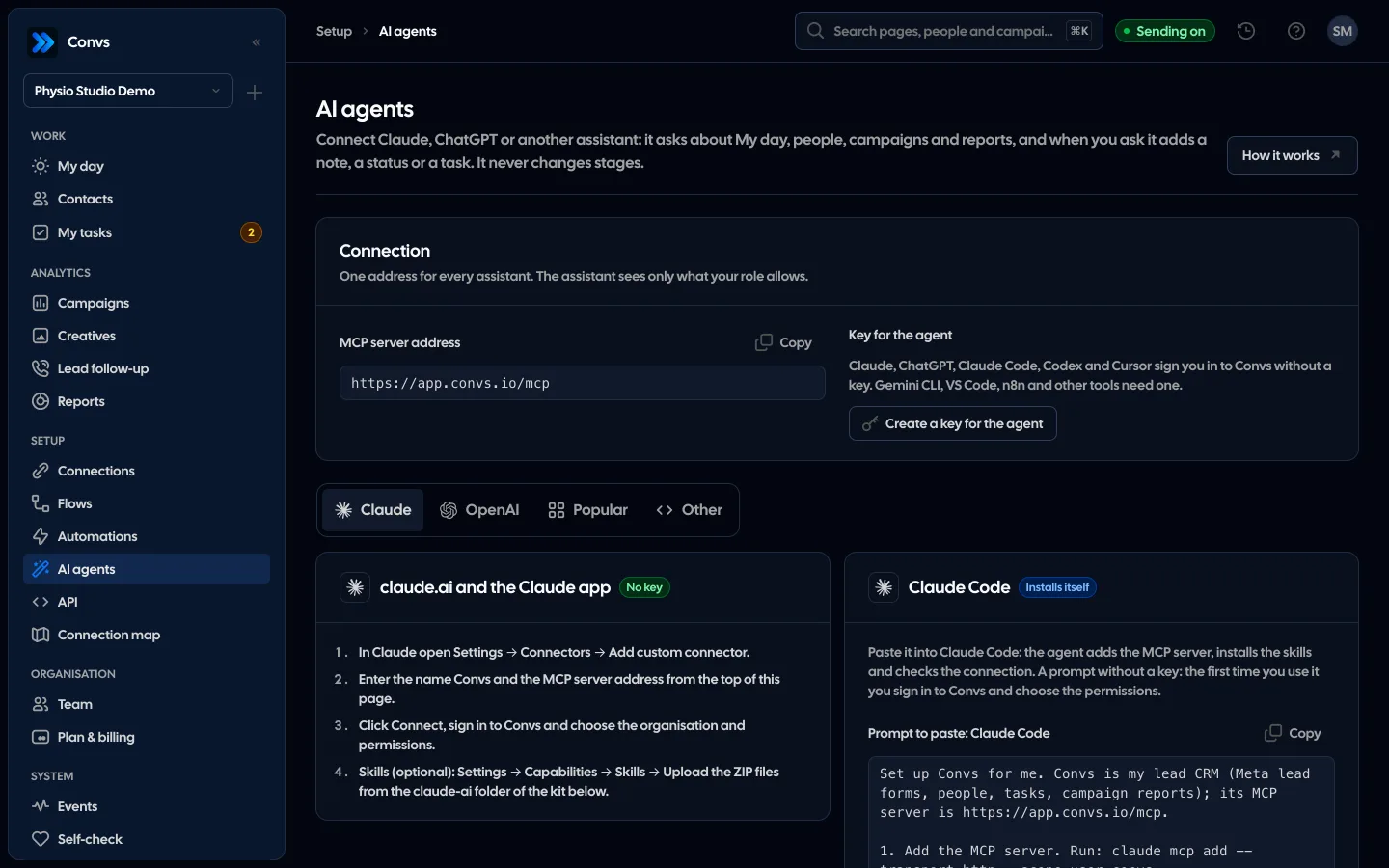
Screenshots from a demo organisation. People and numbers are fictional.
You ask your way, the assistant reaches into the app
The assistant uses the same data and permissions as you. It reads My day, people, campaigns and reports, and writes only what you ask for.
Your day in one question
The assistant reads My day and answers in working order: first leads nobody has called, then follow-ups and overdue tasks.
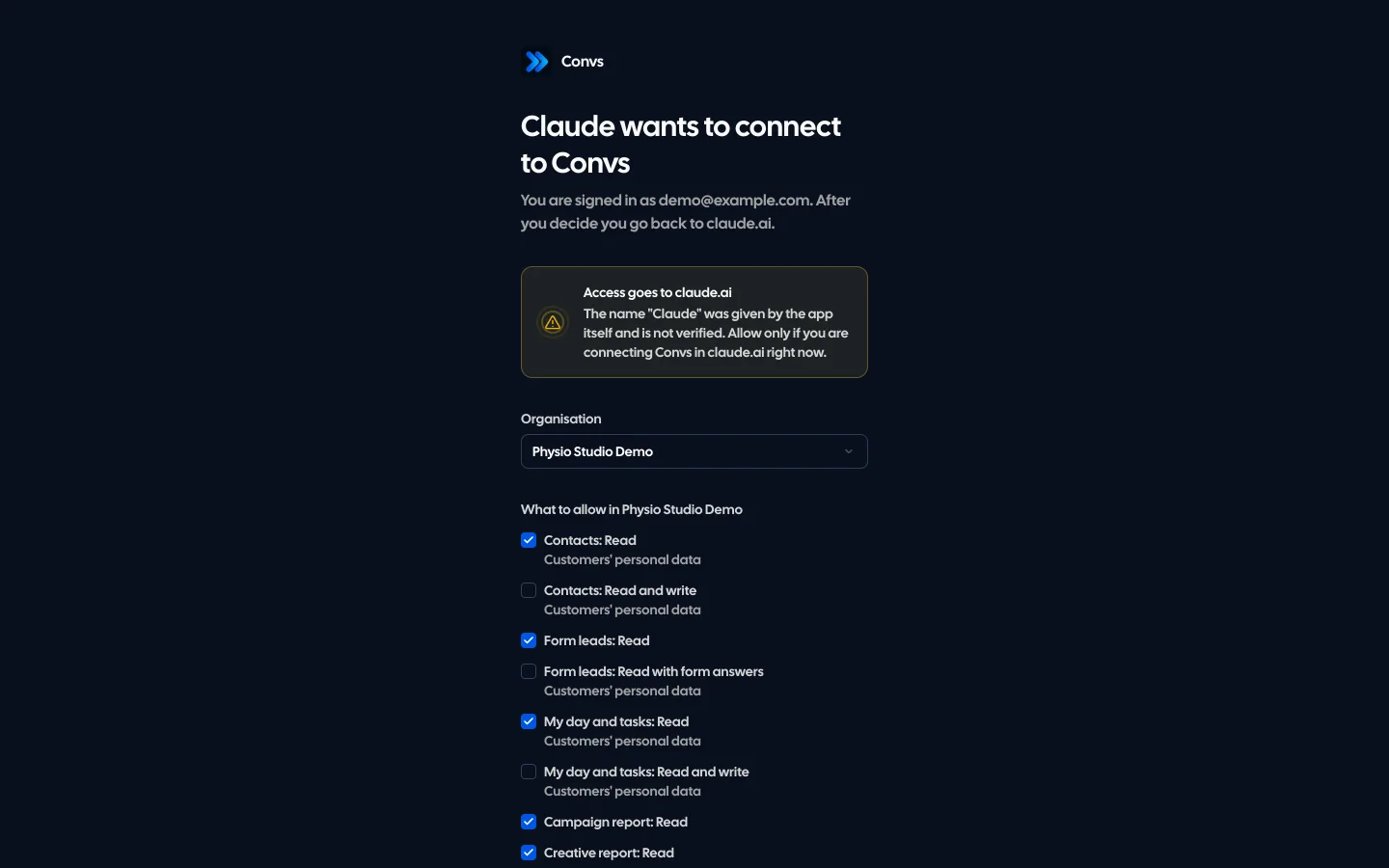
Consent in your app
When connecting you pick the organisation and the permissions. Only reading is ticked at first.
Reads a lot, writes little
Notes, statuses and tasks when you ask. Stage changes stay in the app because they send conversions to Meta.
A client report in a minute
Spend, leads, qualified leads and lead handling for the same period, compared with the one before.
Example data
Two ways to connect
MCP server address: https://app.convs.io/mcp. In claude.ai and ChatGPT the Connect button is enough. Developer tools connect with an API key.
The Connect button
no keyclaude.ai, ChatGPT and other assistants with custom connectors.
- Add the address as a custom connector and click Connect.
- Sign in to Convs and choose the organisation and permissions.
- The assistant acts for you, with your role.
API key
Claude Code, Cursor, n8n and your own scripts.
- On the AI agents page click "Create a key for the agent".
- Paste the ready prompt: the agent adds the MCP server and the skills itself.
- Changes are saved for the person who created the key.
What the assistant can and cannot do
The assistant’s tools are the same operations as in the app. It sees only the ones the chosen permissions allow.
| Action | Assistant |
|---|---|
| My day, tasks, people with the Contacts filters, person card with history | |
| Campaign, creative, team and lead response reports | |
| Campaign readiness and Self-check | |
| Note, call, status, task (when you ask) | |
| Stage change (sends a conversion to Meta) | |
| SMS, payments, keys, team members |
Your role applies to the assistant too
Permissions from the connection are cut to your role on every request. A salesperson who sees only their own people will not see anyone else’s through the assistant. Disconnect it in Account → Connected apps.
Skills: ready ways of working
Skills teach the assistant what stages, statuses and first contact mean in Convs and how to do common jobs. The kit has a Claude Code plugin, files to upload to claude.ai and AGENTS.md for other tools.
Download the skills and plugin (ZIP)Morning review
convs-morning-reviewWhat to do first and who has waited longest.
Client report
convs-client-reportA week or a month compared with the one before.
Campaign diagnosis
convs-campaign-diagnosisWhy Meta does not optimise for quality and what to fix.
Lead clean-up
convs-lead-cleanupLeads nobody called and overdue tasks, changes after you confirm.
An AI assistant can misread numbers. They come from the same reports as in the app, so check them there when in doubt.
Only if you give it the Contacts permission and your role allows it. Permissions with personal data are marked on the consent screen. The assistant treats form answers and notes as data, not instructions.
Stage changes stay in the app. Statuses and overdue tasks can trigger configured SMS or webhooks; fresh diagnostics may retry failed Meta deliveries and related API webhooks. The assistant should explain these effects before making a change.
AI agents are included in the Growth, Agency and Custom plans at no extra cost. On Free and Start you can try them for 5 days from creating your account; after that the assistant gets a plan message instead of data until you pick Growth or higher. You pay for the assistant itself with its provider, e.g. your Claude or ChatGPT plan.
In Account → Connected apps click Disconnect. It works at once. Revoke an API key on the API page.
Related features
- For agenciesA separate workspace per client, roles, an all-clients overview and job queues.See details
- Security and privacyEncryption, hashing, roles, retention and self-hosting.See details
- CRMOne person per phone or email, full history, stages, owner, tasks and “My day” with the order of work.See details
- Campaign reportingMeta spend joined with CRM stages: cost per lead, per qualified lead and per sale.See details
- Meta Conversions APILeads, sheet rows and orders sent to Meta from a server, without duplicates.See details
Get started in under 5 minutes
Connect your Meta account and see which forms send good data and which need fixing.
- Free up to 100 leads a month
- No developer needed
- Automatic connection checks