Know what broke before your client notices
Leads stop arriving without a message: a login expires, someone pauses a form, Meta starts rejecting events. Self-check looks at your whole setup in one place and shows what to click for every problem.
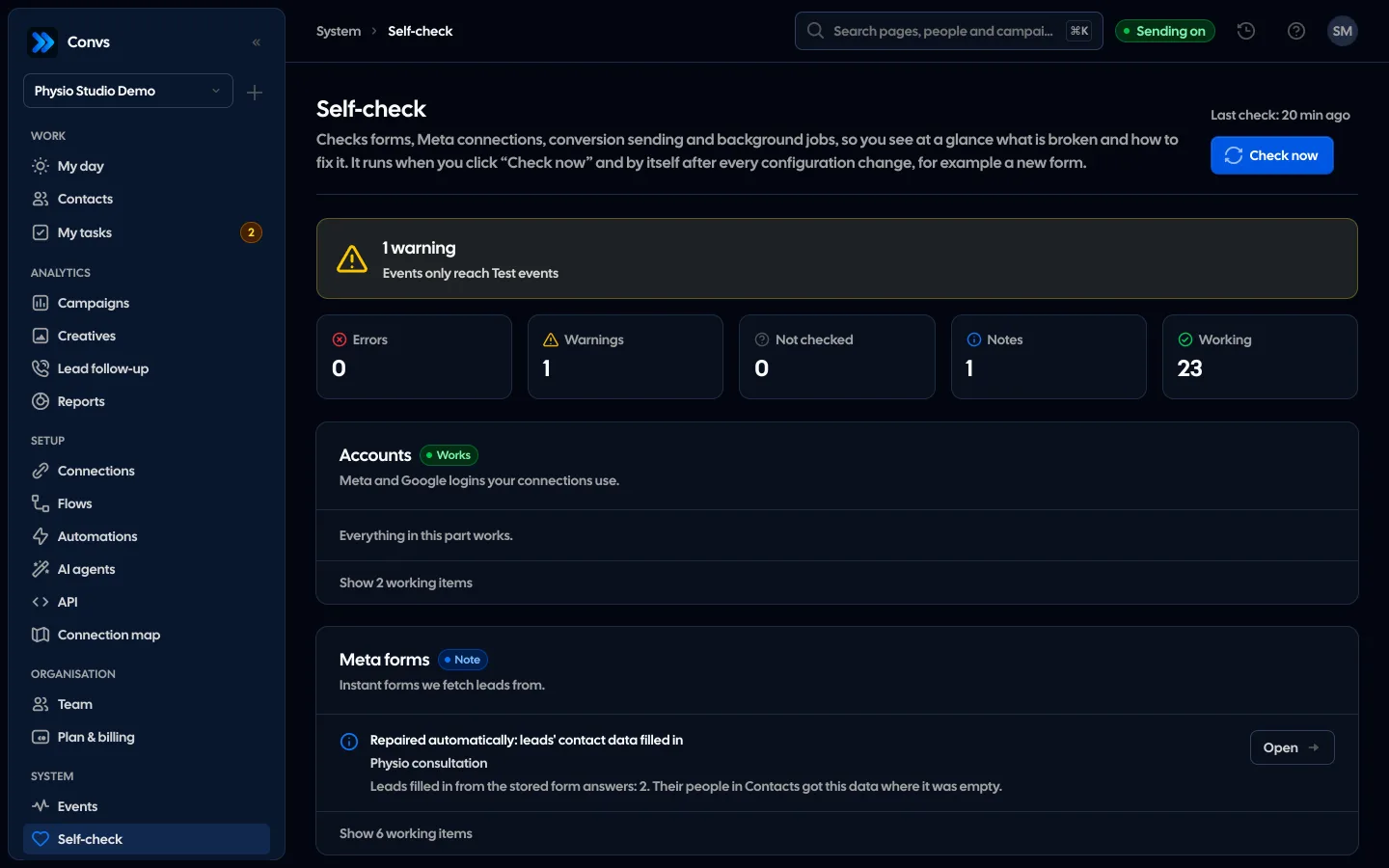
Screenshots from a demo organisation. People and numbers are fictional.
The result, the fix and what repaired itself
One check ends with a summary, a card for every area and a list of the repairs we made without you.
Your whole setup in one result
At the top, the number of errors, warnings, things not checked, notes and working items. The error count also sits next to Self-check in the menu.
At every problem: what to click
Every warning and error has a description, a fix and an “Open” button that takes you to the place in the app where you make it.
Some things repair themselves
When the cause has passed, the check sends rejected events again and retries failed lead fetches, each only once, and records it as “Repaired automatically”.
Readiness of every ad set
Seven conditions for lead-quality optimisation for each ad set and campaign, with what to fix. Met conditions do not prove that Meta already optimises that way.
Example data
See it in 20 seconds
Short clips from the panel with a demo organisation’s example data, no sound.
- Self-checkSelf-check tests accounts, forms, sending and sources, and every finding says what to fix.
Eight areas in one check
Each area has its own card with a result and a list of checks. Errors come first, and their count sits next to Self-check in the menu.
Accounts
Meta and Google logins behind forms, receivers and sheets: disconnected while still in use, needing a reconnect, Meta access expired or expiring within 7 days.
Meta forms
A paused form, no confirmed legal basis, access to the Page and its leads, no flow, no leads for 7 days judged against spend, failed fetches.
Sending to Meta
Sending off or paused, dataset access, test mode, a missing token, rejected and waiting events, Meta’s own statistics next to our sends.
Conversions
A non-Meta source without a flow, a flow to a paused receiver, stages from the last 30 days that no flow sends.
Other sources
Google Sheet read errors or no read for over an hour, a shop or server with no conversion at all or no new one for 7 days.
Background jobs
Failed jobs from the last 24 hours that nobody resolved, and jobs running for over an hour.
Automations
Live automations with failed steps in 7 days, SMS accounts in error, automation sending switched off on the server.
Campaigns
How fresh each ad account’s spend is (older than 26 hours is a warning) and creatives waiting to be read.
Five results, each with a fix
A result is more than a red badge. Each check has a description, a fix and a link to the place in the app where you make it, and for a dataset also a link to Events Manager. The last 20 checks stay in the history.
| Result | What it means | What you do |
|---|---|---|
| Error | Something does not work now, such as a paused form or Meta rejecting events | Click the link by the result and fix the place it shows |
| Warning | It works, but something is breaking or about to, such as a login expiring within 7 days | Fix it before it becomes an error |
| Not checked | Meta did not answer (rate limit, network), so we do not know whether there is a problem | Check again in a moment; it is never a false error |
| Note | Something worth knowing, including a repair made automatically | Nothing, unless you want to look |
| Works | The check passed | Nothing |
Some things repair themselves
When the cause has passed, Self-check does not wait for you. It records every repair in the result as “Repaired automatically”. What needs a person, such as a new login or an access in Meta, it only reports.
Rejected events
onceSent again when Meta or the network failed, or when the receiver has a token again. Events Meta refused for their data are not sent again.
Leads to fetch
onceFetches a form’s leads that failed to download in the last 7 days again, and reads its questions when we do not know them.
Contact details
Fills in the name, phone and email of leads saved without them, from the answers we already have.
Failed job
onceRuns a background job again when it failed for the first time in a day. A lost Meta login is not retried.
When it checks
It does not run on a timer or when you open the page, so it never spends your Meta limits for nothing. You can also start it with “Check now”, up to 6 times an hour.
- 1
A setup change
A source, receiver or flow added or removed, an account reconnected, the first read of an ad account.
- 2
Two quiet minutes
The check waits 2 minutes after the last change, so it does not start on every click.
- 3
One background job
One job, shown in Background jobs, checks all eight areas; it first makes the repairs it can make itself.
- 4
Result and count
Every role with access sees the result; the number of errors appears next to Self-check in the menu.
Readiness and event matching
Two tools next to Self-check. Readiness shows, for every ad set, which of the 7 conditions for optimising on lead quality are met. “Match events” compares your stage names with what your dataset knows and proposes changes.
- Readiness: form connected, stages sent, sends succeed, stages every day, enough leads, share of valuable leads, ad set optimises for quality
- “Match events” renames the stages in every form flow of a receiver at once
- It can send the last 7 days of stages again under the new names, after showing how many
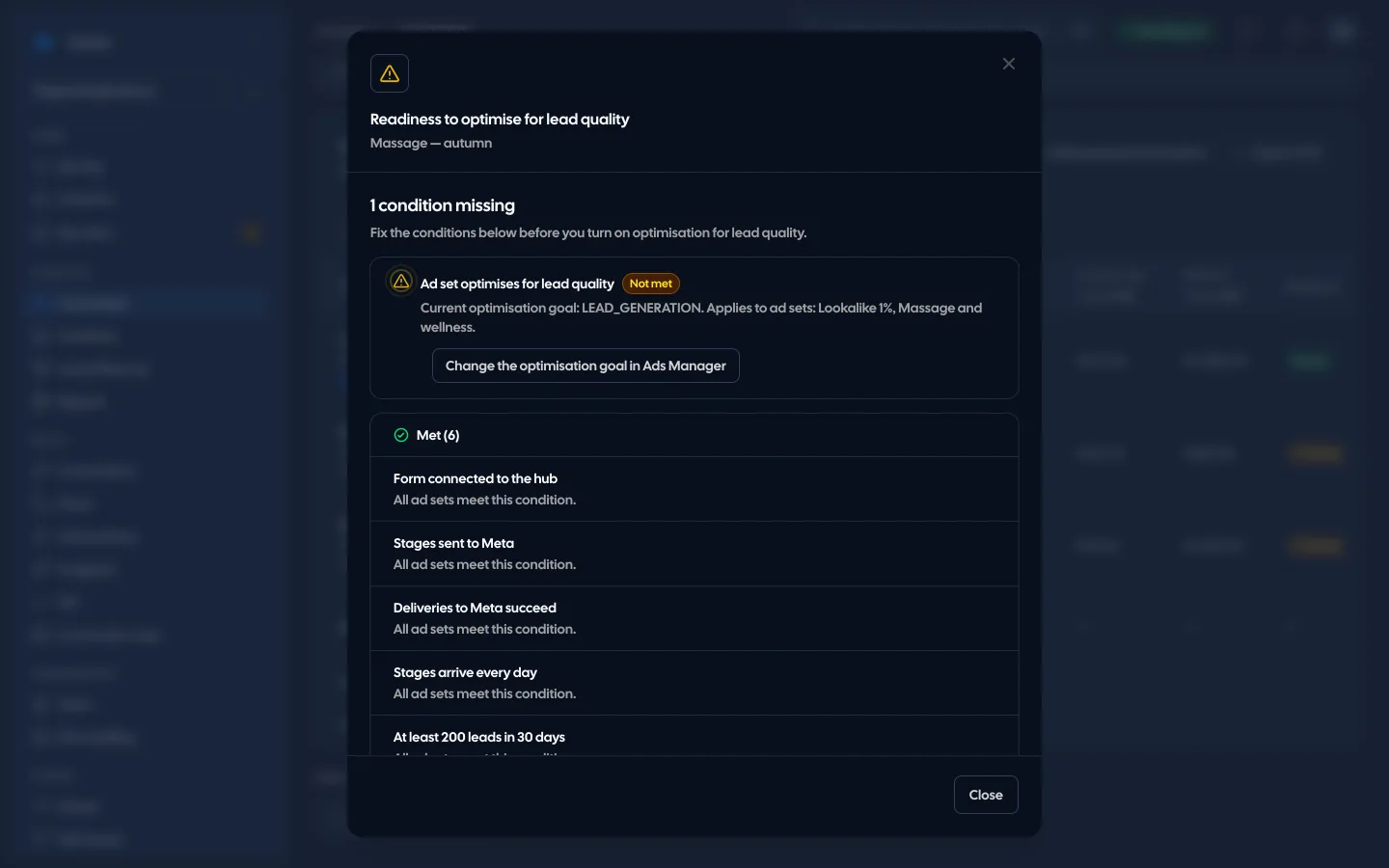
A green result means the Convs side of your setup and its access to Meta work. It does not prove that a campaign optimises on your events or how Meta attributes conversions. Check that in Events Manager and Ads Manager.
Open Self-check and click “Check now”. The most common causes are an expired Meta login, a paused form and lost access to the Page’s leads. Each comes with a link to the place where you fix it.
No. It runs after a setup change and on “Check now”. A silent failure on Meta’s side shows up in the next check, so click it whenever the numbers look off.
Meta did not answer the request, for example because of a rate limit or the network. We do not know whether there is a problem, so we do not show an error. Check again in a moment.
No. It reads data from Meta and changes nothing there. It only repairs things on the Convs side, such as fetching leads again or resending rejected events, and records that in the result.
Every role with access to Self-check. The Viewer role sees login names masked. Owners, admins and operators can click “Check now”.
Related features
- Meta Conversions APILeads, sheet rows and orders sent to Meta from a server, without duplicates.See details
- Meta lead formsInstant Form leads in your CRM as they come in, with their answers and the ad they came from.See details
- Google Sheets and ShoperSales from a sheet and orders from your shop sent to Meta as conversions, no developer needed for the sheet.See details
- CRMOne person per phone or email, full history, stages, owner, tasks and “My day” with the order of work.See details
- Campaign reportingMeta spend joined with CRM stages: cost per lead, per qualified lead and per sale.See details
- For agenciesA separate workspace per client, roles, an all-clients overview and job queues.See details
Get started in under 5 minutes
Connect your Meta account and see which forms send good data and which need fixing.
- Free up to 100 leads a month
- No developer needed
- Automatic connection checks