Server-side events for Meta, none lost and none doubled
Convs takes in submissions from Meta forms, Google Sheets and your shop, then sends them to the Meta Conversions API. Every delivery has its own result, and failures go back to the queue.
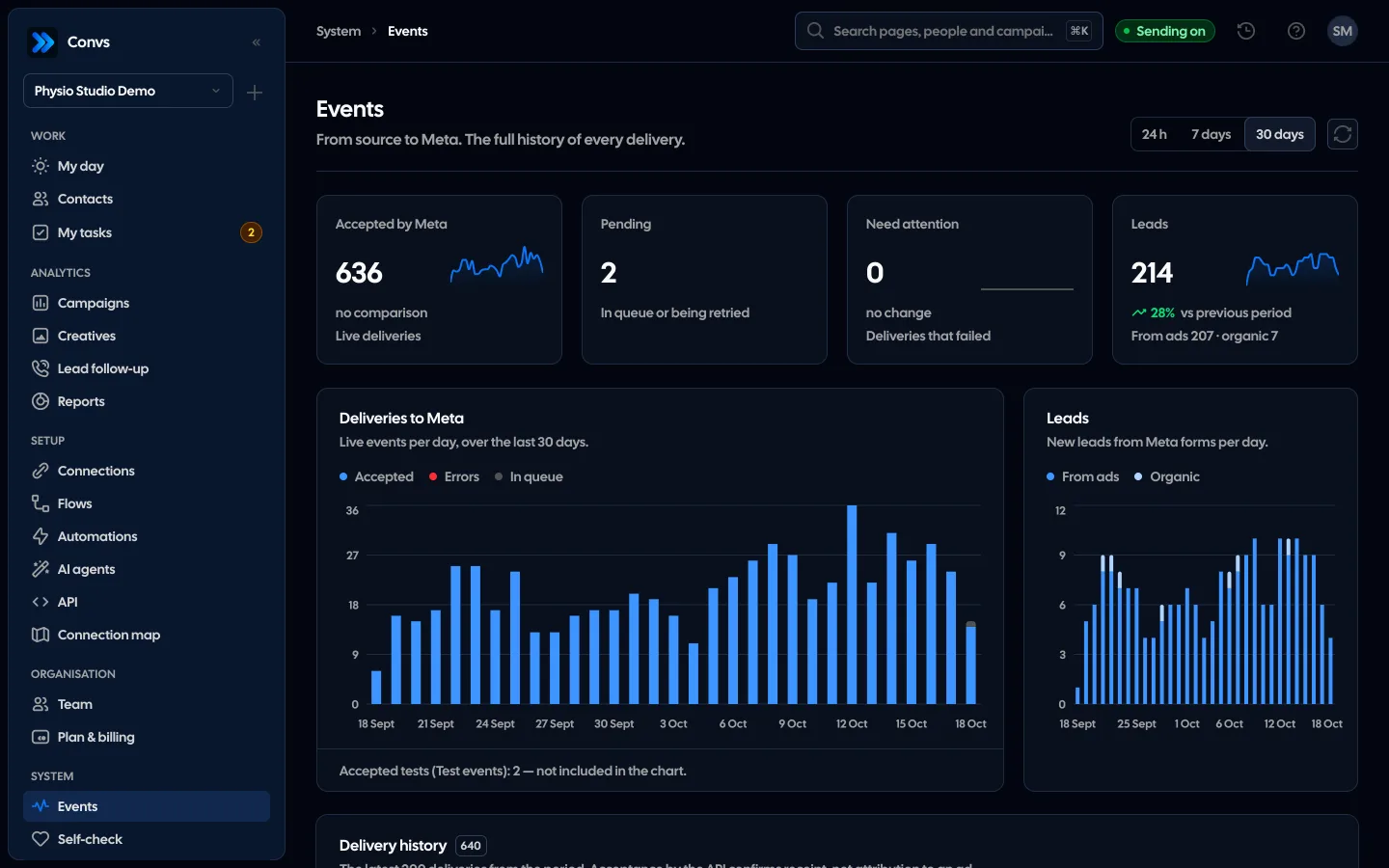
Screenshots from a demo organisation. People and numbers are fictional.
An event that arrives once
From a form, a sheet or a shop to a dataset in Meta, with a result on every delivery.
Three sources, one queue
A Meta form lead, a sheet row and a paid order go into the same durable queue, then to a dataset in Meta.
Every delivery has a result
A network error goes back to the queue and is retried with the same event_id. “Accepted” means received by the API, not attributed to an ad.
The same event counts once
A repeated status from the same source does not create a second delivery.
CRM stages as CRM events
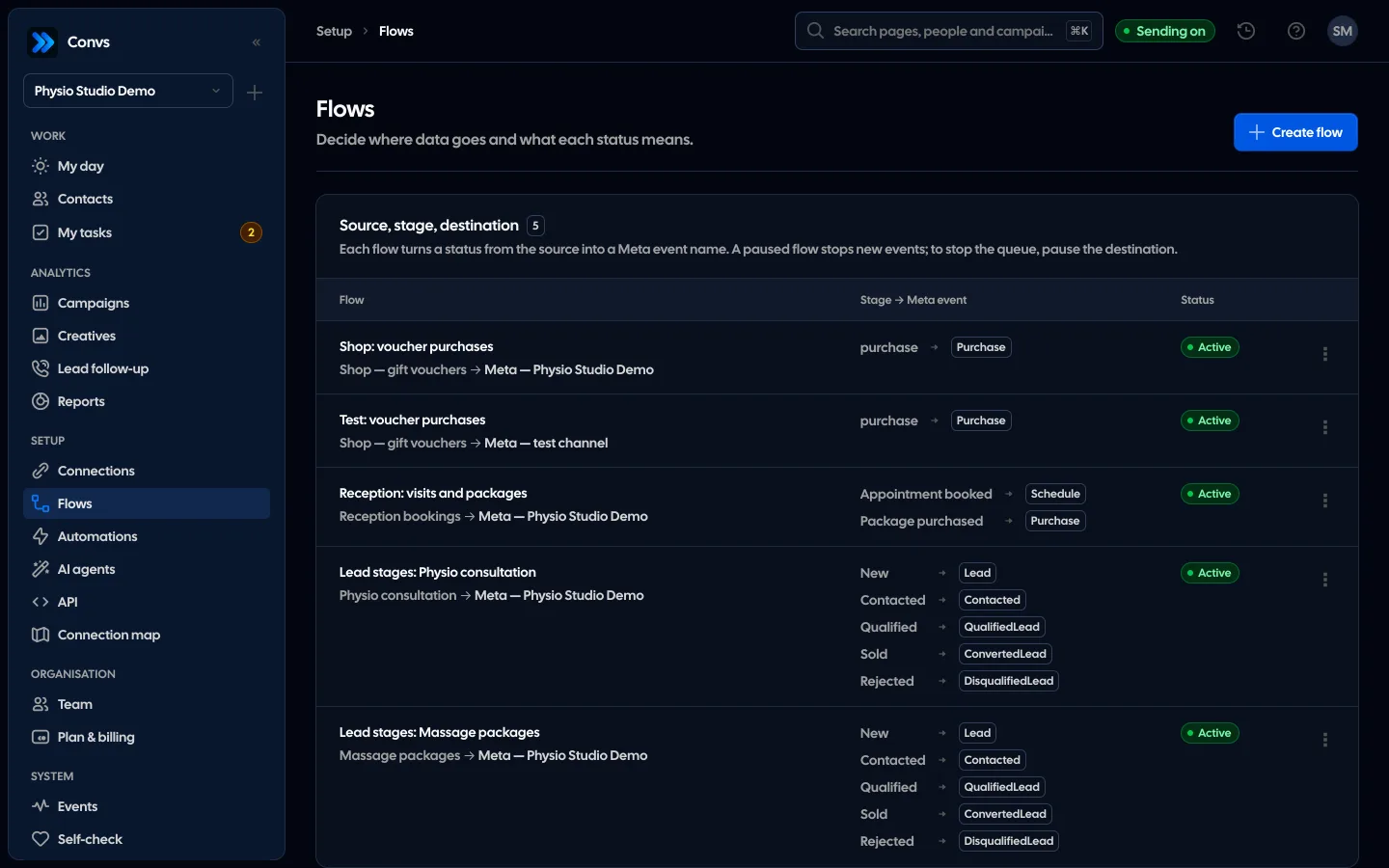
A new form flow gets default event names for the five lead stages. You can change them.
Match events to the dataset
We read 28 days of the dataset and propose, for each stage, a name the dataset already knows. You pick the funnel’s positive stages in Events Manager.
Example data
See it in 20 seconds
Short clips from the panel with a demo organisation’s example data, no sound.
Three sources, one queue
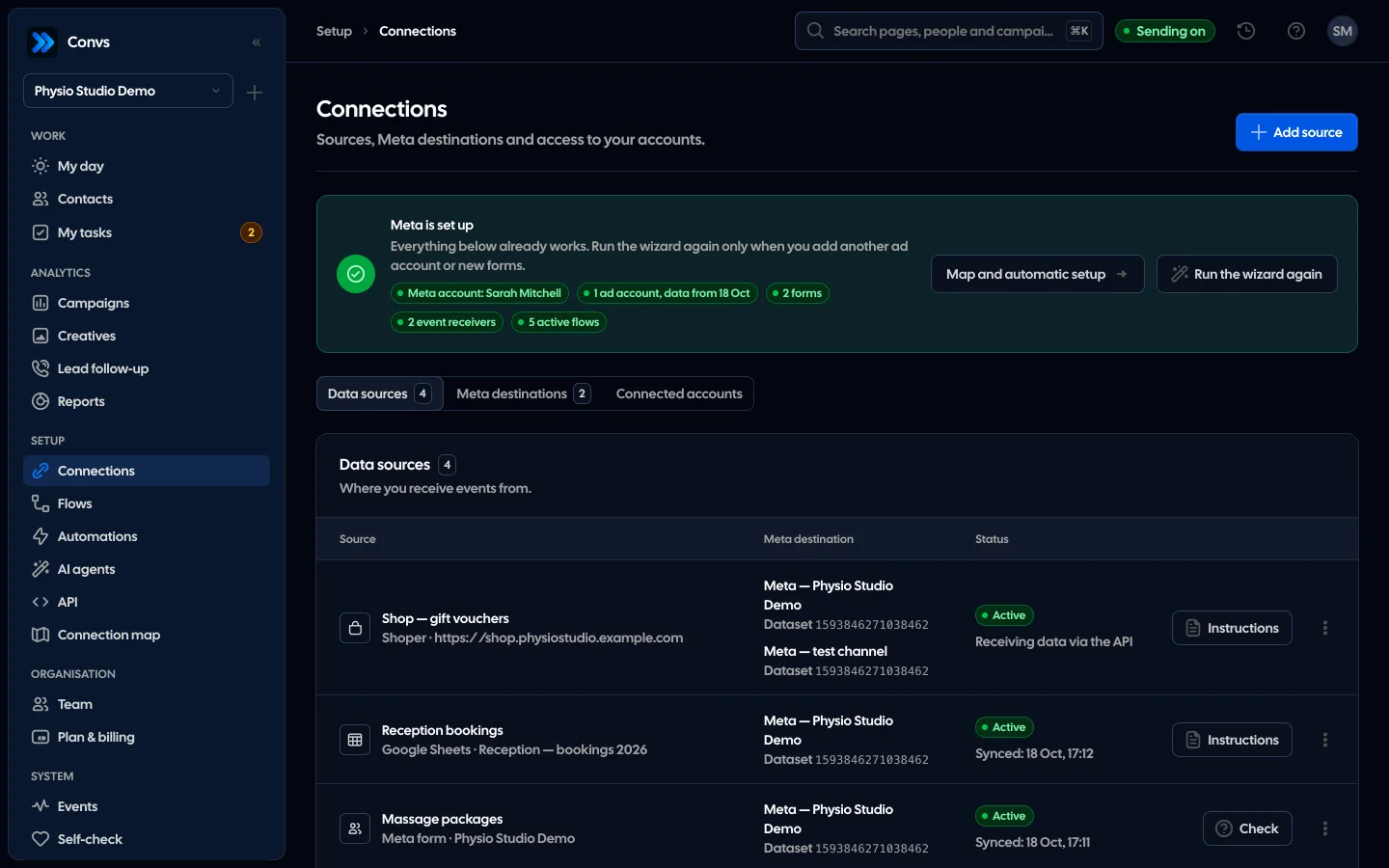
Connect a Meta form, a Google sheet or a shop. Each source can send to several Meta datasets, and each destination has its own delivery status.
- Meta forms: polled every 5 minutes, or as they arrive through the Page webhook
- Google Sheets: pick a tab and map columns, synced every minute
- Shop: your shop’s server sends paid orders to the hub, the browser script runs only after consent
An event’s way to Meta
Every event goes through the same steps, whatever its source. Each one leaves a trace in the app.
- 1
Intake
The event is stored. The same ID and status from a source is one conversion.
- 2
Flow
It picks the event name and the dataset. Email and phone are hashed with SHA-256.
- 3
Durable queue
The event waits until Meta accepts it. A server restart does not drop it.
- 4
Batches of up to 500
Events for one dataset go together. A refused batch is sent again one event at a time.
- 5
Result
“Accepted by Meta” or an error with Meta’s description, on every delivery.
Turn a status or stage into an event
A flow says what goes to Meta and under which name. For example, “paid” in a sheet becomes Purchase, and the “Qualified” stage becomes QualifiedLead.
Nothing lost, nothing sent twice
Delivery works “at least once”, and repeats are caught by deduplication on our side and by event_id on Meta’s.
What Self-check looks at| Safeguard | What it does |
|---|---|
| Deduplication on intake | The same ID and status from a source is one conversion, for good |
| A second guard | Dataset, event name and event_id: two destinations on the same dataset will not send an event twice |
| Retries | Up to 6 attempts on network errors and Meta’s temporary codes, always with the same event_id |
| Hashing | Email and phone normalised and hashed with SHA-256 before sending |
| Event time | No older than 7 days; a retry never makes it younger |
Connection map
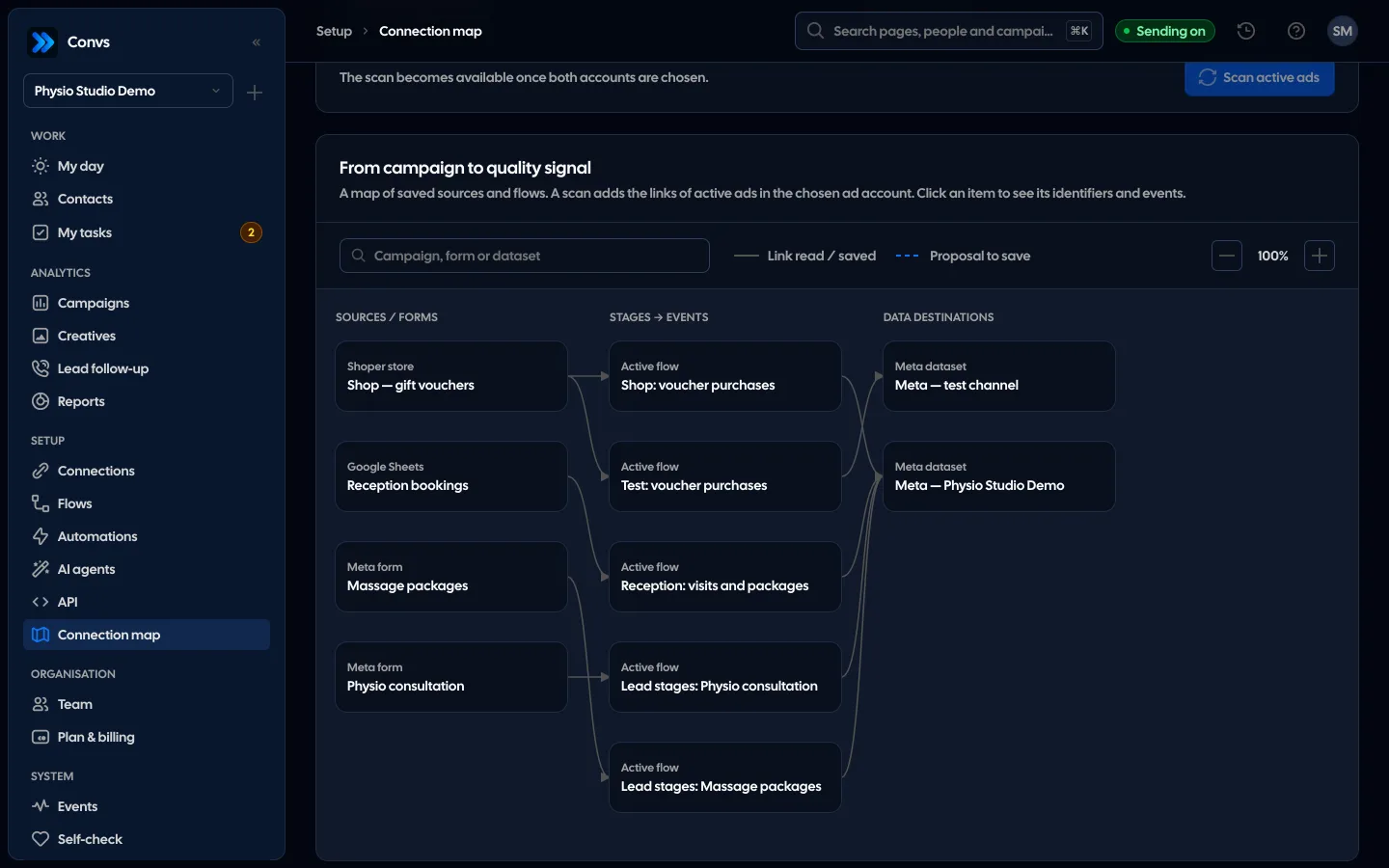
Campaigns, forms, flows and datasets on one graph. Scan one chosen ad account and see right away what is missing.
Test first, then go live
Three ways to see your events in Events Manager before you rely on them.
Destination test mode
When you check the whole delivery before launch.
- Events carry the code from Test events
- Deduplication separate from production
- You switch mode once nothing unsent waits in the queue
Test CRM events
When you want to see a lead’s stages in Events Manager.
- Takes the lead ID that Meta generates
- Reads the lead through your connected forms and sends its stages through the normal queue
- Up to 10 times an hour per destination
Test event
For a shop: checking one order.
- Sends the newest shop event once, with your test code
- Stores nothing in the queue
- Up to 10 times an hour per destination
Meta accepting an event through the Conversions API does not prove your campaign optimises for it, or how Meta attributes conversions. You check that in Events Manager and Ads Manager.
No. The Pixel and the Conversions API can run together. If both send the same event, use the same event name and event_id, and Meta counts it once.
The delivery is marked as failed with Meta’s description. Temporary errors are retried automatically, and you can retry the rest by hand after fixing them.
Yes. A destination in test mode sends events with a test code, so you see them in Events Manager before anything reaches production.
Yes. According to Meta’s help page “About performance goals for lead ads” (checked on 13 October 2026), from April 2026 the “Maximize number of qualified leads” goal is not available to new campaigns without a Conversions API integration, and from August 2026 the change also covers existing campaigns. The goal works with both Instant Forms and website forms. Convs sends your CRM stages through the Conversions API.
Related features
- Meta lead formsInstant Form leads in your CRM as they come in, with their answers and the ad they came from.See details
- Self-checkOne check of your whole Meta, sources and automations setup, with a link to the fix for every problem.See details
- Google Sheets and ShoperSales from a sheet and orders from your shop sent to Meta as conversions, no developer needed for the sheet.See details
- CRMOne person per phone or email, full history, stages, owner, tasks and “My day” with the order of work.See details
- Campaign reportingMeta spend joined with CRM stages: cost per lead, per qualified lead and per sale.See details
- For agenciesA separate workspace per client, roles, an all-clients overview and job queues.See details
Get started in under 5 minutes
Connect your Meta account and see which forms send good data and which need fixing.
- Free up to 100 leads a month
- No developer needed
- Automatic connection checks