Sales rep performance, from the call to the sale
One page for the owner and the manager: what came in during the chosen period, what it cost, what the team did with it and how each person compares with the team average.
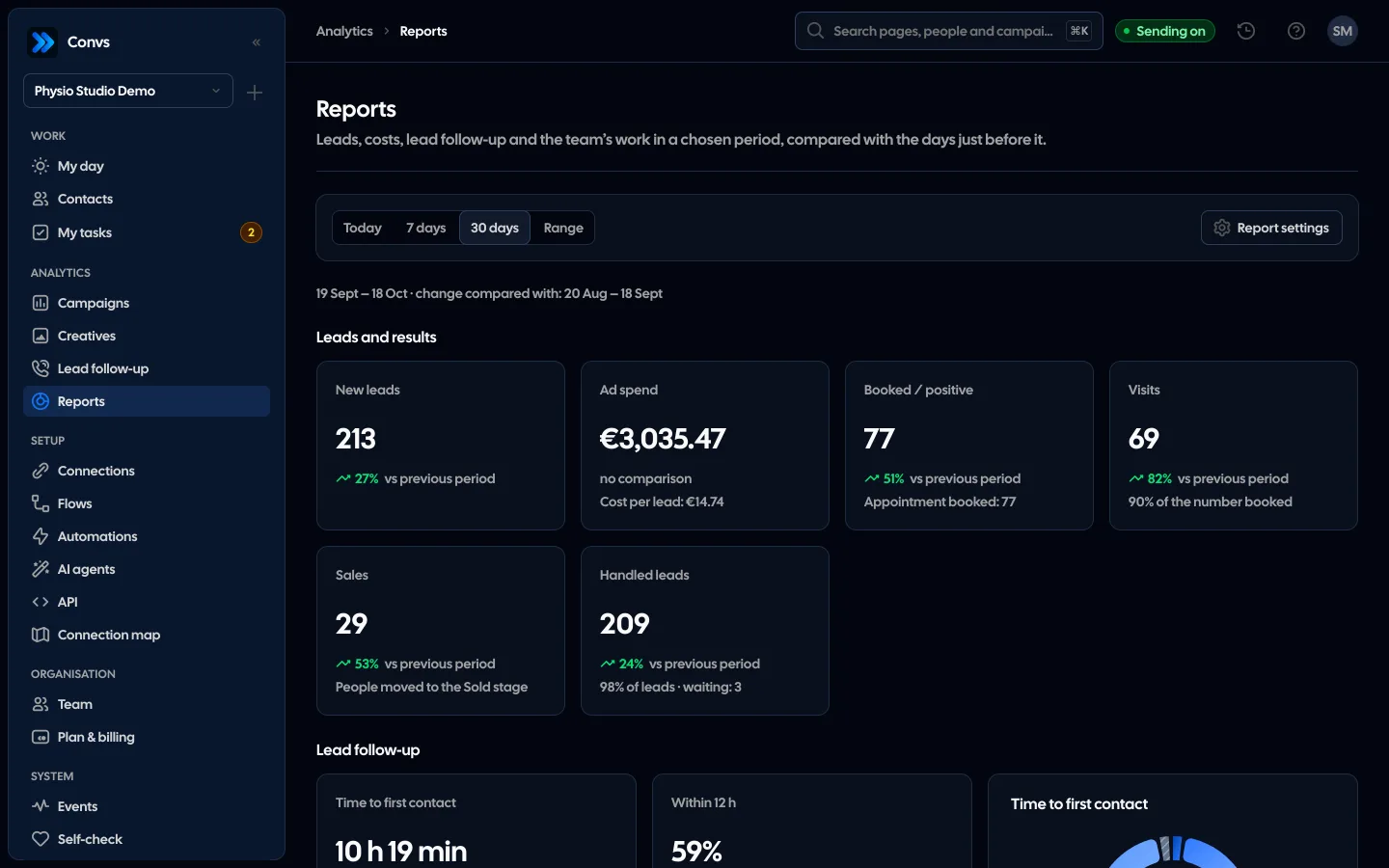
Screenshots from a demo organisation. People and numbers are fictional.
The whole team on one page, each next to the average
Reports count what came in, what the team did with it and what came of it. Each client counts once, and a result goes to whoever set it.
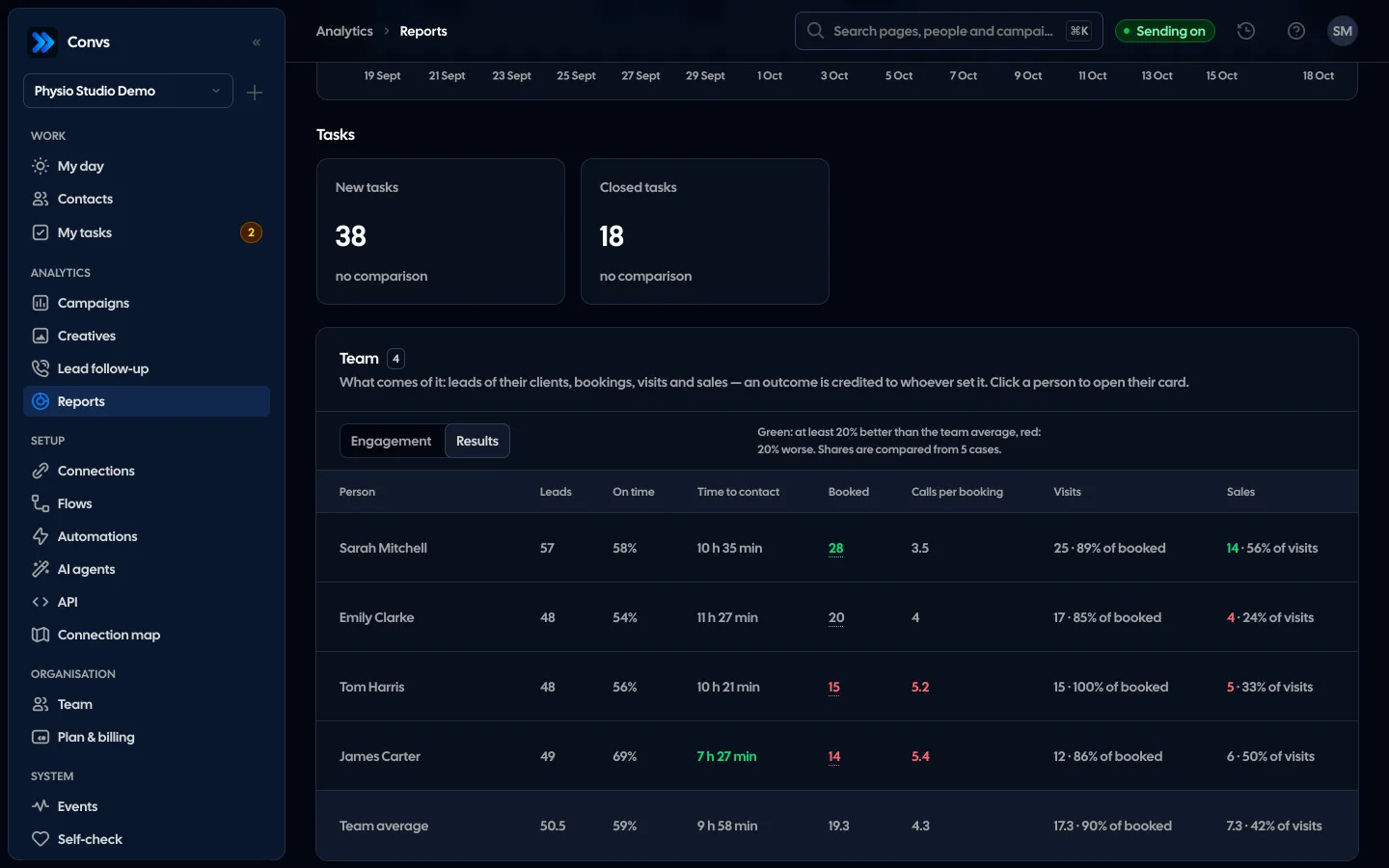
Every salesperson’s results
Booked, calls per booking, visits and sales in one table. Green is at least 20% better than the team average, red 20% worse.
The member card
Click a person to see their way from the call to the sale and how many make it through each step.
You decide what counts as positive
Pick in the report settings which statuses and stages count as booked. You can see what the number is made of.
The period next to the one before
Today, 7 days, 30 days or your own range. Each number with its change against the same number of days just before.
Calls day by day
A person’s first and repeat calls next to the team’s average per person. Automated work is not counted here.
Example data
The period from above
Pick today, 7 days, 30 days or your own range of up to 366 days. Every number shows the change against the same number of days just before the period.
New leads
Meta leads fetched in the period, history imports left out.
Ad spend
CampaignsSpend and cost per lead from Campaigns, when you have access to them.
Booked
People with a “positive” outcome you choose yourself.
Visits
People with the visit status you chose, as a share of those booked.
Sales
People moved to the Sold stage.
Lead response
Median time to first contact, share within the limit, burned and waiting.
You decide what counts as a result
In “Report settings” you choose what counts as booked and as a visit; the choice applies to the whole company and the owner or an admin changes it. Each person counts once, by their last outcome in the period.
| Result | By default | What you can choose |
|---|---|---|
| Booked (“positive”) | The “Appointment booked” status | Internal statuses and the Contacted, Qualified and Sold stages |
| Visit | Statuses whose name starts with “Odbyt” (visit held) | Any internal statuses |
| Sale | Moving the person to the Sold stage | A fixed rule |
Calls and next attempts
A call is a “Call” entry or a status that counts as a contact, such as “No answer”, one per person per minute. You see first and repeat calls, meetings and a day-by-day chart. Next contact attempts due in the period get one of four outcomes.
On time
Contact before the attempt was due or within an hour after.
Late
Contact came, but later.
No contact
The due time and the hour of grace passed with no contact.
Pending
Not due yet.
Team: engagement and results
The team table covers everyone who works with clients, also those who did nothing in the period. It has two views, both with a “Team average” row.
Engagement
How much each person works.
- Active days, such as “5 of 7”
- Calls, repeat calls included, and calls per day
- People called
- Next attempts of their clients on time
- Overdue and done tasks
Results
What comes of it.
- Leads of their clients, share within the limit and time to contact
- Booked and calls per booking
- Visits as a share of booked
- Sales as a share of visits
Next to the team average
Colour tells you where someone stands out before you start reading the numbers.
- At least 20% better than the average is green, 20% worse is red
- Shares are compared only from 5 cases
- An outcome is credited to whoever set it, not to the owner on paper
- Automation work is not counted
Member card: from the call to the sale
Clicking a person opens their card: the funnel with the steps between, how they work next to the team average, and their calls day by day next to the average per person.
How we measure response time- 1
Calls
Calls and statuses that count as a contact.
- 2
Booked
People with a “positive” outcome, with calls per booking.
- 3
Visits
How many of those booked came to the visit.
- 4
Sales
How many visits ended in a sale.
The report counts what the team logs in the CRM. A call nobody logged does not exist in it. The numbers show how the team works, but on their own they do not judge a person: talk to them before you draw conclusions.
From the person’s history in the CRM. The outcome is credited to the team member who set that person’s last chosen status or stage in the period. Hovering over the number shows what it is made of.
No. Each person counts once, by their last outcome in the period: qualified, then booked and sold is one outcome. Visits and sales also count each person once.
Choose your own status for a visit in report settings. With no status chosen, visits are not counted, and the tile tells you what to set.
The owner, admin, Operator and Viewer by default. Custom roles see reports only once they are given access. Ad spend shows only with access to Campaigns.
No. The report holds numbers only, with no client names, phone numbers or answers. Names appear only for team members.
Related features
- Campaign reportingMeta spend joined with CRM stages: cost per lead, per qualified lead and per sale.See details
- Creative analyticsCost per qualified lead, CRM-based ROAS, hook rate and a fatigue signal for every creative.See details
- Lead response timeResponse time for every Meta lead: on time, late, burned or waiting, with the cost of burned leads.See details
- CRMOne person per phone or email, full history, stages, owner, tasks and “My day” with the order of work.See details
- Meta Conversions APILeads, sheet rows and orders sent to Meta from a server, without duplicates.See details
- For agenciesA separate workspace per client, roles, an all-clients overview and job queues.See details
Get started in under 5 minutes
Connect your Meta account and see which forms send good data and which need fixing.
- Free up to 100 leads a month
- No developer needed
- Automatic connection checks