After-Hours and Weekend Leads: How to Keep a Saturday Lead from Going Cold by Monday
A lead lands at 10:05 pm on Saturday. How to time the automatic text, set a Monday callback task, run a weekend rota and measure response time honestly.
See it in 20 seconds
Short recordings of the panel with an example organisation, no sound.
On this page
- What happens to a lead that arrives at 10:05 pm on Saturday?
- Should the text go out right away or in the morning?
- How do you set a Monday-morning callback task?
- Who covers the weekend, and how do they get the lead?
- How should you measure response time for weekend leads?
- Limitations: what this process won't fix
- Where should you start?
- Sources
It's 10:05 pm on a Saturday. Someone scrolling Instagram sees your ad and fills in the form. Meta passes the lead on straight away, but nobody at your company is working. On Monday at 9 am a rep faces a dozen weekend leads and calls them in whatever order they happen to see them. Here is how to set up the stretch from Saturday night to Monday morning so that lead isn't lost, and how to measure response time without fooling yourself.
What happens to a lead that arrives at 10:05 pm on Saturday?
Meta delivers it immediately; the delay happens on your side. With no process, the lead sits in an inbox or a sheet until Monday, about 35 hours. With a process, it gets a text in the morning, an owner and a dated task, and the rep starts Monday with that lead instead of a random queue.
Integrations receive form leads through webhooks or a bulk read, and the webhook fires the moment the lead is created, Saturday night included. Here is an example timeline for one lead (example data), with and without a process.
| When | No process | With a process |
|---|---|---|
| Sat 10:05 pm | No processLead sits in an inbox or a sheet | With a processLead in the CRM, owner from round robin or offered to the weekend cover |
| Sun 8:00 am | No processNothing | With a processAutomatic text: "Thanks, we'll call you on Monday morning" |
| Sun 10:05 am | No processNothing | With a processWith a 12-hour limit, the report marks the lead as burned |
| Mon 8:00 am | No processRep opens the inbox | With a process"Call back" task sits at the top of My tasks |
| Mon 9:00 am | No processA call, if the lead wasn't lost | With a processCall logged on the person as first contact |
The difference isn't that someone works weekends. It's that on Monday morning everyone knows who calls whom, and in what order.
Should the text go out right away or in the morning?
In the morning. An automatic text after a lead should confirm the request and say when someone will be in touch, and a late-night message annoys more often than it helps. Pick the earliest sending time and write a message that doesn't promise a call "in a moment" when the real answer is Monday.
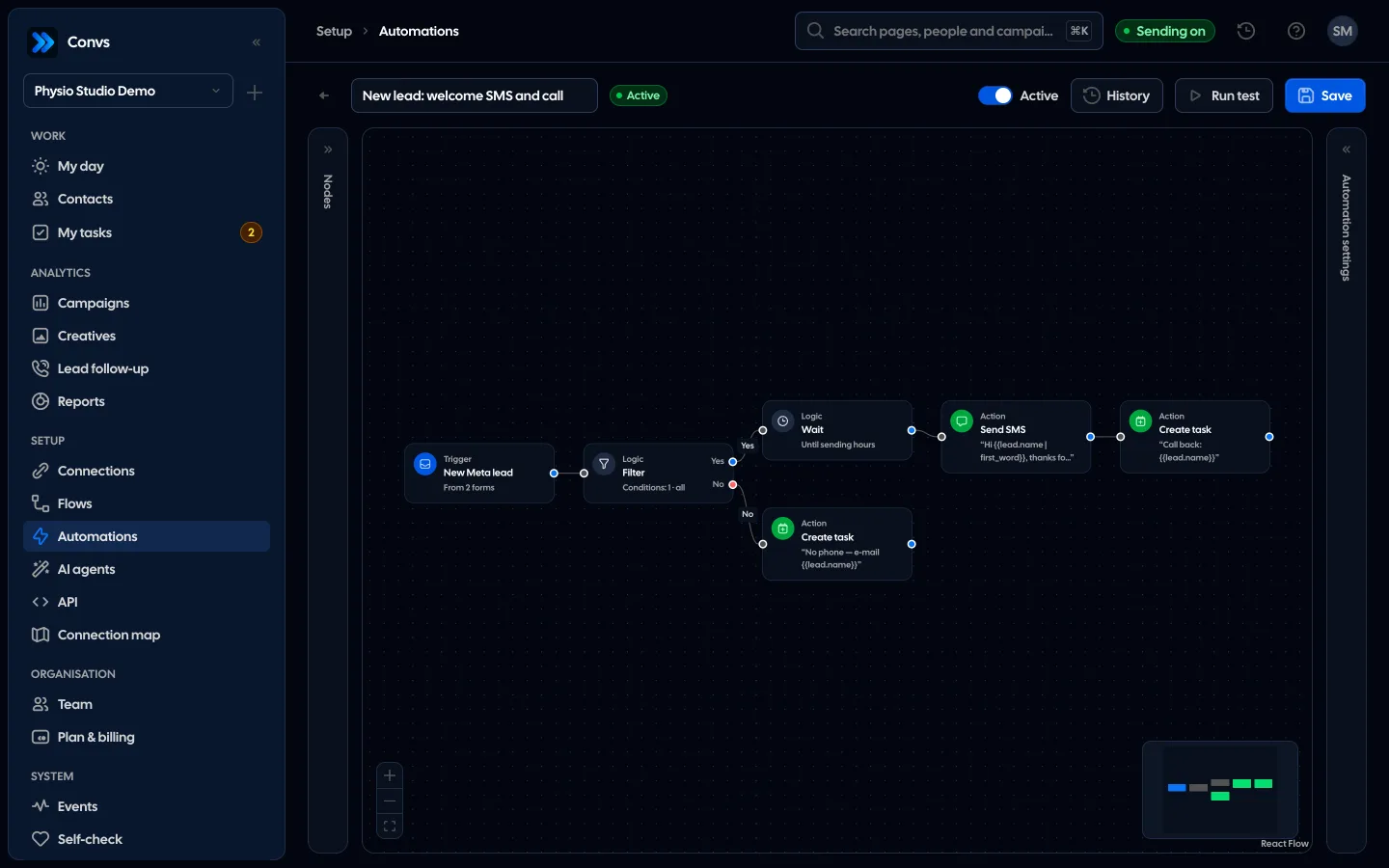
In Convs, automatic texts only go out between 08:00 and 20:00 in the organisation's time zone. A step that falls outside those hours waits until 08:00. So the Saturday 10:05 pm lead gets its text at 8:00 on Sunday. The panel doesn't distinguish days of the week, so Sunday is just another day to it: if you'd rather not text people early on a Sunday, say so in the message, or skip the automatic text at weekends and handle it by hand.
Two things to know before you switch it on:
- Daily cap. An organisation sends at most 500 texts a day; after that, steps wait for the next day. That won't matter on a quiet weekend, but it can during a big campaign.
- Do-not-text list. Numbers on the list are skipped, and a person marked "Do not text" blocks messages to every number on their card.
What the text should say, consent, and what it shouldn't try to do are covered in our article on automatic SMS to new Meta leads.
How do you set a Monday-morning callback task?
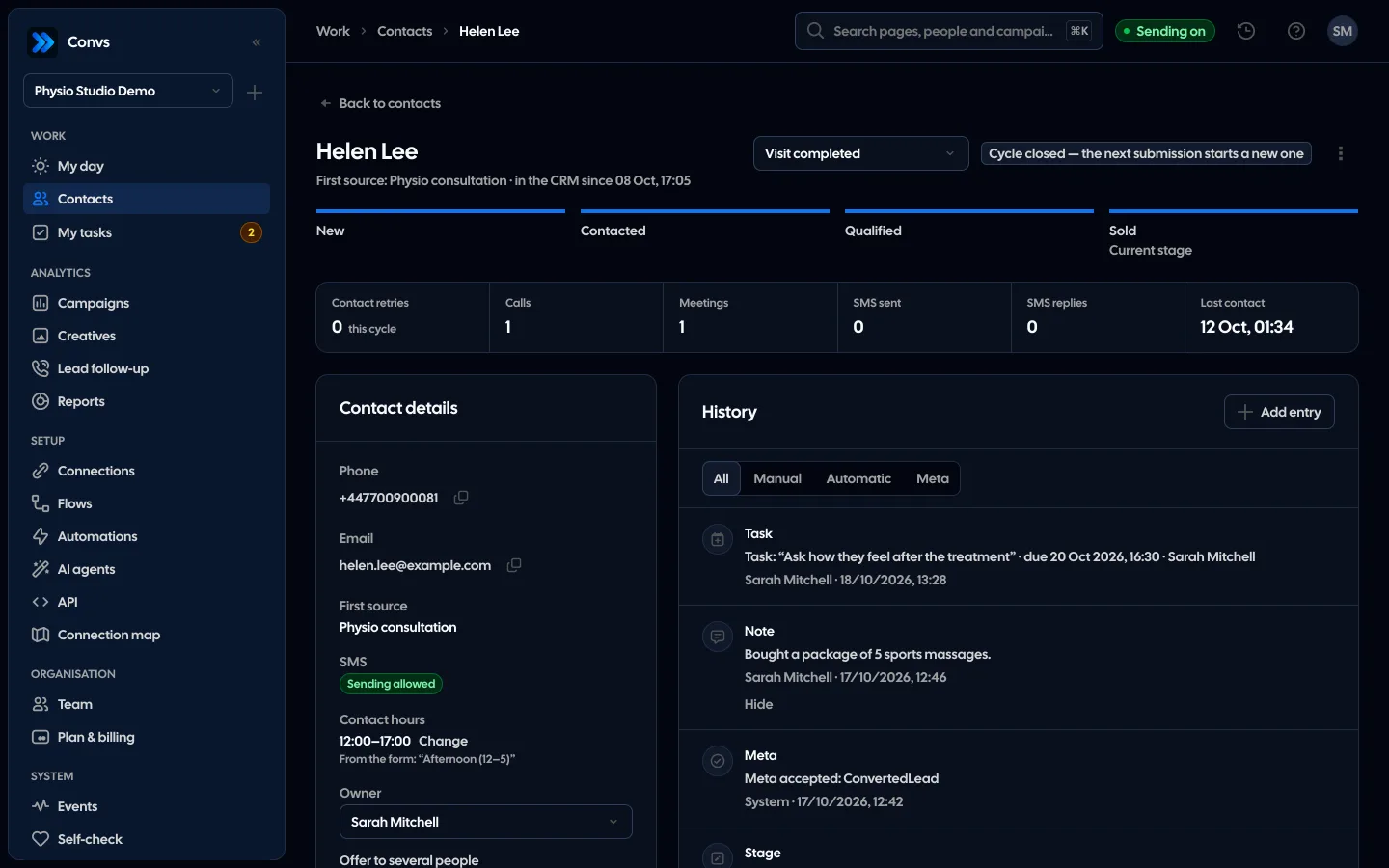
Create a task for the owner in the same automation as the text, with the due time moved into working hours. If nobody works weekends, a task due on Sunday morning shows up on Monday in the rep's Overdue section. That's a good place for it: overdue tasks sit at the top and the menu badge counts them.
The "Create task" action sets a due time from 0 minutes to 30 days after the step, and can move it into 08:00 to 20:00. It goes to the person's owner, a chosen team member or the next person in round robin. One gap is worth naming: Convs doesn't know business days, so it can't set "next working day". A fixed offset such as 35 hours suits Saturday night, but a Friday-night lead would then be due on Sunday.
Two practical ways around it:
- Due "next morning". A task due at 8:00 on Sunday is overdue on Monday and leads the rep's list. The rep starts the day with overdue tasks rather than the inbox.
- Weekend cover. If someone works weekends, a Sunday due time is real for them and the lead doesn't wait until Monday.
Reps can also push a task back a day, a week or to a chosen date, and log the call on the person when they tick it off.
Who covers the weekend, and how do they get the lead?
Weekend cover is a business decision, not a tool setting. The tool can only route leads consistently to the person or group who agreed to it. The simplest version: one named person per weekend who receives leads and may claim them, plus a rule for leads nobody has picked up by Sunday evening. Everyday assignment models (manual, round robin, first to claim) are compared in how to assign leads to sales reps.
Convs gives you three options, each with a trade-off:
- Round robin. Every new person without an owner goes to the next member of the pool. Fair during the week, but at weekends a lead can land with someone who's off.
- A chosen team member. "Assign owner" with one named person. It works, but changing the cover means editing the automation every week.
- Offer to several people. The lead goes to several candidates, and whoever clicks "I'll take it" or calls first becomes the owner. Good when a loose group shares the weekend.
Pair the offer with the trigger "Lead unclaimed after X hours" (1 to 168 hours, default 4). If nobody takes the lead, the automation can assign it permanently or send a webhook, for example to a team chat that accepts incoming webhooks. If someone claims the lead first, the waiting steps are skipped. How leads reach the CRM in the first place is covered in Meta lead ads to a CRM.
How should you measure response time for weekend leads?
In plain clock hours, without hiding the weekend. Switching off nights and Saturdays makes the report look better, but it stops describing what the customer felt: 35 hours from form to phone call. Review weekend leads separately if you like, but keep them in the count. How to measure response time and set a limit for the whole team is covered in speed to lead.
The Lead follow-up report in Convs measures first contact from the moment the lead arrives: the earliest call, meeting or stage change on the person. Notes and automatic texts don't count. The limit (1 to 168 hours, default 12) is clock time with no weekend exception, so a Saturday lead under a 12-hour limit will usually show as burned. That isn't a reporting bug; it's an honest reading.
What to do about it:
- Don't raise the limit for everyone. A 48-hour limit hides the weekend, and it also hides slow follow-up on an ordinary Tuesday.
- Look at weekends on their own. The lead table's CSV export includes the lead date and the minutes to first contact, so you can filter Saturdays and Sundays in a spreadsheet.
- Look at the money. The report shows spend on burned, on-time and late leads. If you pay for weekend leads that wait a day and a half, that's an argument for weekend cover or for limiting delivery at weekends. How to price a lead that actually went somewhere is covered in cost per qualified lead.
If you expect a surge around the holidays or Black Friday, the same process has to scale. There's a checklist in our article on handling the Black Friday lead surge.
Limitations: what this process won't fix
It shortens the path from Saturday night to Monday morning, but it doesn't replace the person who makes the call. The tool also doesn't know your company calendar, so some decisions stay with you.
- No business days in Convs. Sending hours (08:00 to 20:00) apply every day, a task's due time is a fixed offset, and the first-contact limit counts clock hours. The panel doesn't recognise weekends or public holidays.
- Automations only start for fresh leads. The "New Meta lead" trigger takes leads under 24 hours old that arrived after the automation was switched on. Importing older leads never texts anyone.
- Sending has to be enabled on the server. Until it is, steps wait and the panel says so.
- Weekend cover is a team agreement. The panel doesn't plan rotas; changing the person means changing the automation or the round-robin pool.
- We don't know whether weekend leads are worse. We don't quote a figure. Check it on your own data.
Where should you start?
Open the Lead follow-up report for the last 30 days and count how many leads arrived on Saturday and Sunday and how many burned. If it's more than a handful, build one automation: a text from 08:00, a task for the owner and a trigger for unclaimed leads. The Automations page shows the editor, and the Lead assignment page covers assignment and tasks.
Sources
- Meta for Developers: Retrieving Leads (receiving leads through webhooks at creation time or a bulk read)
About the author
Aleksander
Founder of Convs.io, BooksyAudit.pl and SMSPortal.app
Founded Convs.io, BooksyAudit.pl and SMSPortal.app. In the knowledge base he explains how to send leads, CRM stages and sales back to Meta and how to measure what a customer from ads costs.
All articles by the authorFrequently asked questions
Are weekend leads worse than weekday leads?
We don't know, and we won't quote a general figure. Check your own data: filter the Saturday and Sunday leads of the last few months and compare their qualified share with the rest. Weekend leads usually wait longer for a call, so any gap may come from follow-up rather than from the people.
Is an automatic text enough as the first contact?
No. The text confirms the request arrived and says when someone will call. It doesn't replace a conversation. That's why the Lead follow-up report doesn't count automatic texts as first contact; a call, a meeting or a stage change logged on the person does.
What if nobody claims the lead before Monday?
Set a reminder before it gets that far. The trigger "Lead unclaimed after X hours" fires when none of the candidates clicked "I'll take it" within the time you set (1 to 168 hours). It can then assign a fixed owner or send a webhook to your team chat.
Does the first-contact limit count the weekend?
In Convs, yes. The limit is plain clock hours from the moment the lead arrives, with no exceptions for nights, Saturdays or Sundays. With a 12-hour limit, a lead from Saturday 10:05 pm burns at 10:05 am on Sunday unless someone calls first.
Can I text a lead in the middle of the night?
Some SMS gateways technically allow it, but in Convs automatic texts only go out between 08:00 and 20:00 in the organisation's time zone. A lead from 10:05 pm gets the message at 8:00 the next morning. A midnight text to someone who just filled in a form tends to annoy more than help.